Vector databases: What are they and how do they work?
Published 2024-02-11
Table of Contents
The recent and ever-continuing advances in the quality of text, image, and audio transformers have given us access to numeric representations of these data formats that are well beyond what we could have even imagined a decade ago.
Platforms like Hugging Face and others have made accessing these models easier than ever before and have enabled AI practitioners to easily implement a variety of AI powered applications such as semantic search, recommender systems and recently, further improve the usefulness of the responses of generative AI models using retrieval augmented generation.
Underpinning these use cases are databases capable of storing and querying vector data at scale. In this blog post I will be discussing vector databases, what they are, and how they work.
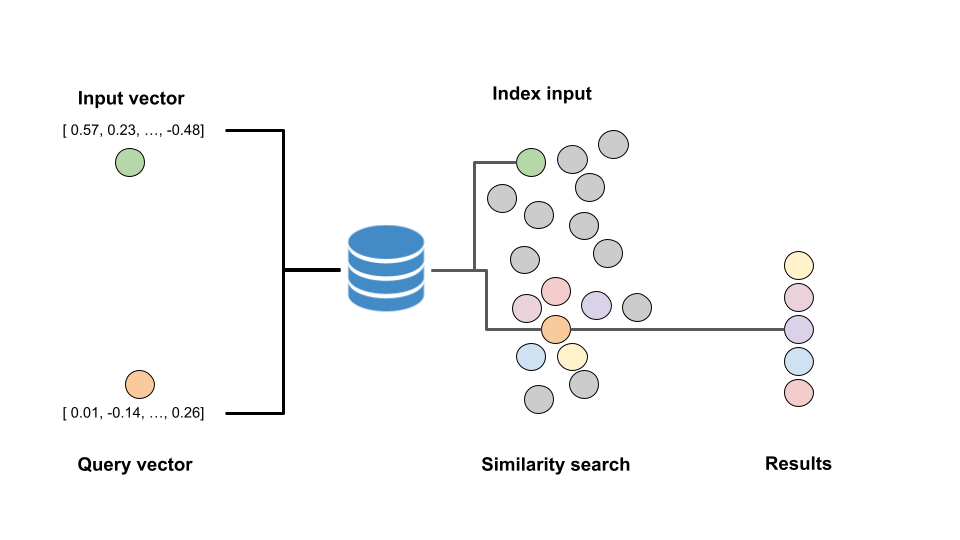
What are vector databases?
A vector database is a type of database that is designed for the efficient storage and retrieval of vector data(i.e. an array of numbers in a multi-dimensional space). Each vector stored in a vector database could represent anything from the semantic encoding of a sentence to the RGB values of an image, and the vector database allows us to perform complex operations and comparisons on these vectors.
Like “regular” databases, vector databases are capable of storing additional metadata about each data-point (things like categories, numeric values, and strings) however unlike regular databases, these values are stored in indexes that are grouped together by their vector similarity rather than being stored as rows and columns in a table.
To illustrate the main difference in the capabilities of a vector database compared to a traditional database consider the interactive example illustrated below.
In the case of the traditional database, the descriptions of films such as Shawshank or The Godfather would be stored in a simple plain text format, however vector databases allows us to store the meaning of these descriptions which enable future users to search semantically for similar movies based on a description rather than simple keywords.
How do vector databases work?
In a “normal” database, information is usually stored in rows and indexed by mapping some field, or combination of fields to a pointer for where a given row can be found in the database. We can then query that database using very simple logical operators such as WHERE field_1 = 'Whatever' AND field_2 > 10.
In a vector database however, we are more interested in querying based on the similarity of the data stored to some input vector. With this in mind, the data must be indexed in a way that facilities the optimal calculation of a chosen distance measure (e.g. cosine similarity) and the retrieval of the most similar vectors.
Exactly how the data is stored will vary slightly between the vector database provider or library used, however most implementations will rely on one or more of the indexing strategies mentioned below to perform what is commonly referred to as an “Approximate Nearest Neighbour” (ANN) search.
Indexing strategies
Flat indexing
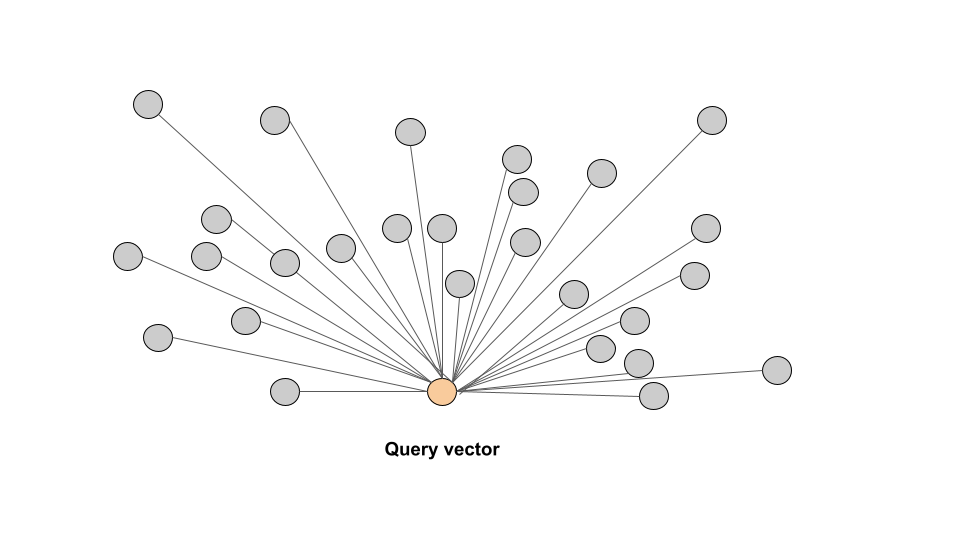
A flat index is the most basic form of index and simply stores each vector as is with no optimisation or transformations performed. When we query a flat index, we compute the similarity of the query vector to EVERY vector stored in the database before filtering the results down to the top K nearest neighbours.
This type of index ensures the highest possible level of accuracy however as you can imagine, this comes with a significant cost in terms of retrieval speed as a result of the comparison to every other vector in the database being made. This kind of comparison may work well for very small databases, however this simply won’t scale well at all once you go past storing a few hundred documents as the vector comparisons will become very computationally expensive, particularly with higher dimension data.
Inverted File Index (IVF)
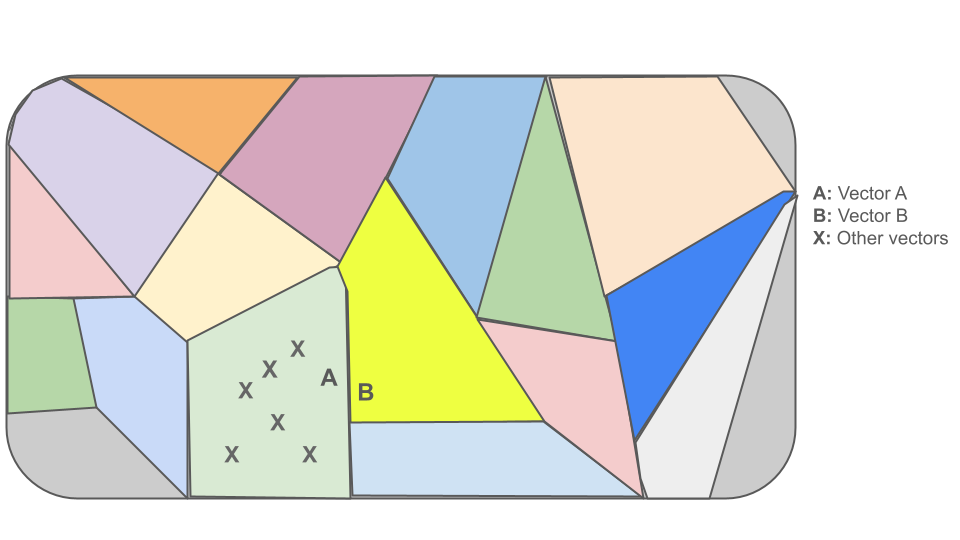
In an IVF index, the vector space is first divided into a number of clusters/partitions using what is essentially a K-Means algorithm. Each vector in the database is then mapped to one of the clusters generated by this algorithm.
When we query the database with a new vector, the database first figures out which cluster the query vector is most similar to depending on it’s similarity to the centroid of that cluster before comparing the vectors similarity to every vector in that cluster.
Of course, the speed and accuracy of querying this kind of index depends on the number of partitions in the database and as you can imagine, we can run into issues with “false negatives” (similar vectors we don’t find) in cases where the vector sits on the boundary of two or more clusters (see vector B below)
Locality Sensitive Hashing (LSH)
In a LSH index, we begin partitioning the vector space into multiple arbitrary hyperplanes. Once these hyperplanes are defined, any vector inserted into the database is then hashed according to their position relative to these hyperplanes and grouped into buckets based on their hashed values.
When we query the database for similar vectors, the query vector will be hashed using the same algorithm and the query vector will then only be compared to vectors which have the same hashed value based on their position in the vector space to determine the exact similarity to each vector in the same “hashing bucket” before returning the similarities in descending order.
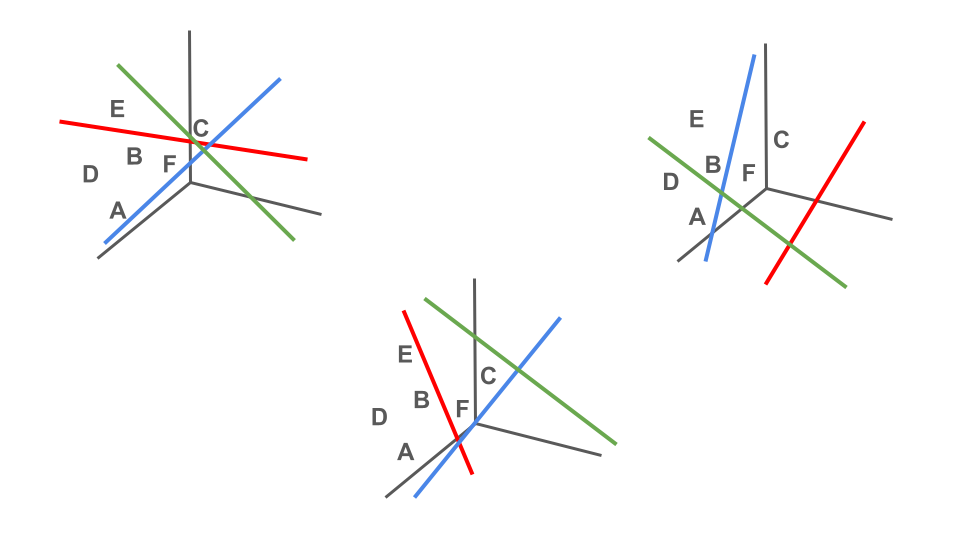
To illustrate this by means of an example, below you can see that we have partitioned our vector space into three separate hyper-planes, partition 1 (red), partition 2 (blue), and partition 3 (green) and each vector is hashed based on their position relative to these hyperplanes (1 for above, 0 for below).
In our example vectors A, B, and D fall into hashing bucket (010), while vector C falls into bucket (111), and vector E falls into hash bucket (110).
If we were to then assume vector F is some query vector that we want to retrieve similar vectors for, you can see that this vector will fall into bucket 010. This means that we will return vectors A, B and D as the most similar vectors.
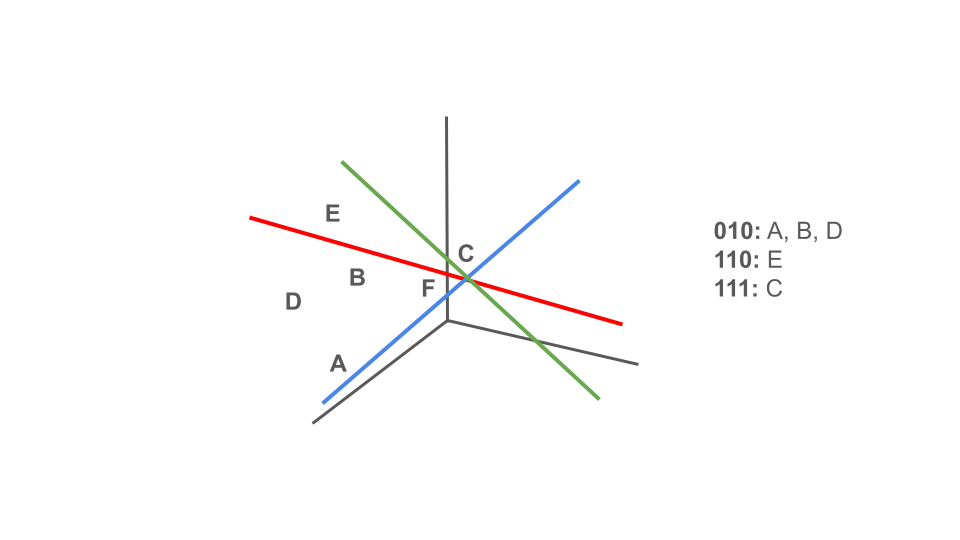
At this stage you are probably wondering, what about vector C!?!?!? Yes, in this case vector C would be missed as it didn’t fall into the same hashing bucket as our query vector F. However in reality LSH creates multiple different hashing tables each made up of different hyperplanes, query vectors are then hashed according to each of these hashing algorithms before the results are combined in the response.
Similar to IVF, there is a balance here to be the struck in terms of the accuracy and the speed of the response. In this case, this balance depends on the number of hashing tables created, and the number of hyper-planes/buckets within each.
Hierarchical Navigable Small World (HNSW)
HNSW is one of the most commonly used indexing techniques due to it’s scalability and accuracy.
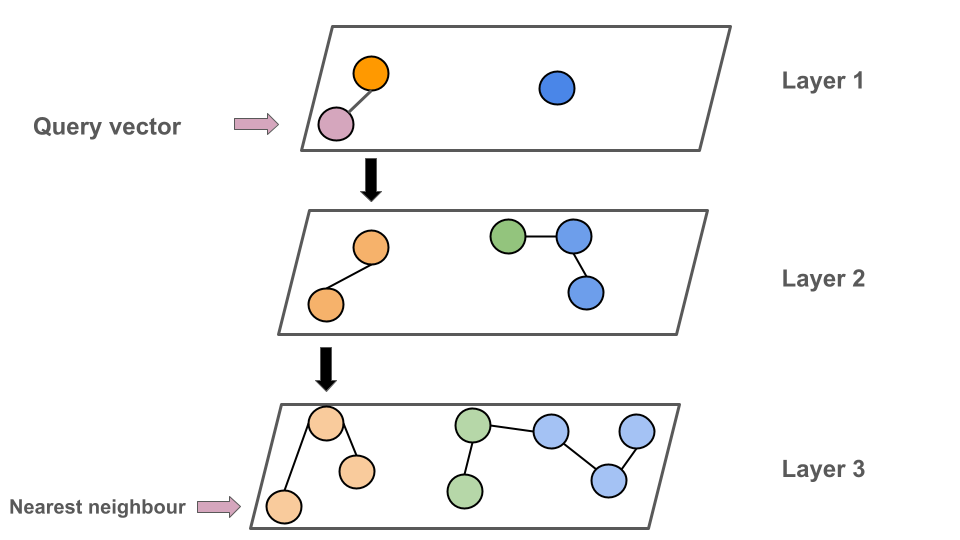
In a HNSW index each each vector is stored in the form of a graph, where each node represents a vector or a small set of vectors, and each edge represents a connection between two nodes based on their similarity. From here, the index then generates a hierarchical, tree-like structure made up off different layers where each layer represents what is essentially and aggregated view of the previous layer.
When we query the index, we begin at the upper-most layer (the highest level of the aggregation). We then navigate our way through the layers of this tree-like structure to find the nodes and vectors at the bottom most level which are most similar to the query vector
Use cases for vector databases
Now that we have an understanding of vector databases and how they work, in this section I will summarise some of the most common use cases for vector databases:
Retrieval Augmented Generation (RAG)
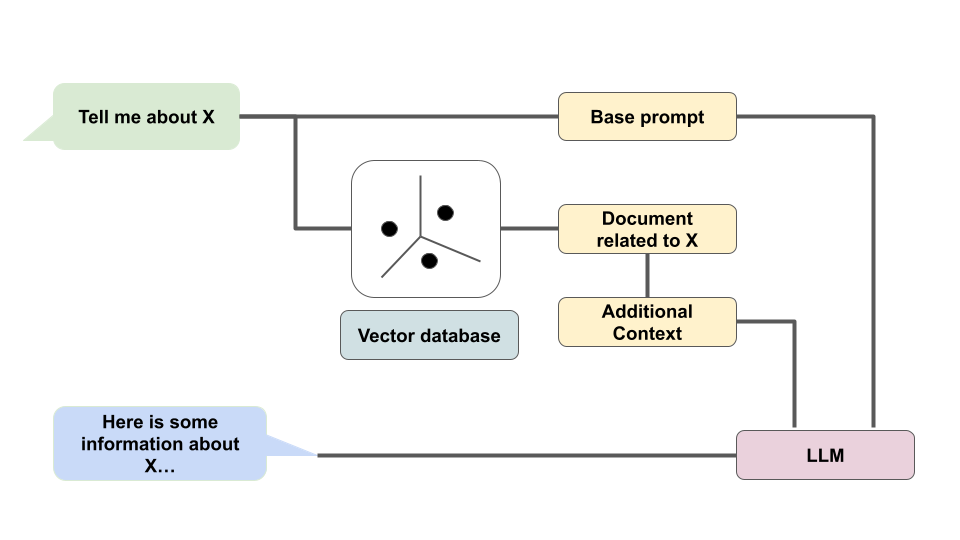
Perhaps the most hyped use of vector databases at the time of writing this blog is RAG. RAG allows us to improve the relevance and usefulness of responses generated by a large language model (LLM) by adding additional context to the prompt based on data stored in a vector database.
For example, if I ask an LLM “Tell me about Paul Minogue, the data scientist from Dublin”, it will either tell me it doesn’t know anything about me, or it will make something up and pretend it is about me. With RAG I can first look up a vector database which contains information about me based on the input question before passing the most similar documents into the the prompt prior to generating the prompt. The idea here is that we can supplement the LLM’s internal knowledge based on it’s training data with additional relevant knowledge from external sources to improve the response.
Semantic text search
The most common use case for vector databases typically falls in the realm of semantic text search. To set up a semantic text search system, we would begin by using some form of transformer model to convert our sentences, paragraphs, or documents to a vector before storing the semantic encoding in a vector database.
From here we can then retrieve for similar strings from the database by using the same transformer model to convert an input sentence to a query vector before sending it to the database. You will see in the examples section how we could very easily set up a database to perform this type of search on descriptions of films.
Image similarity search & verification:
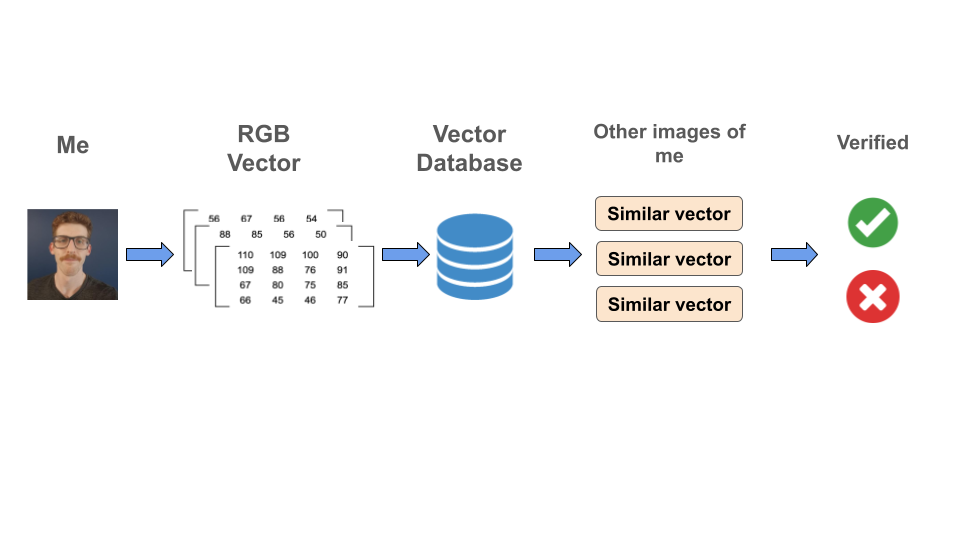
In the same way that we can search for similar strings by converting then to an embedding, we can search for similar images by converting each image to a vector of it’s RGB values (or using an image transformer) and storing this vector in a database. An application built on this could suggest similar items of clothing on a website or verify a users identification based on a photograph provided at login.
Recommender system
Similar to my clothing example above, we could also use a vector database to find products similar to what a user has previously purchased on a website and suggest them to the user. Something like this could be achieved by creating a vector which might represent different features of each product and storing them along with additional information about the products in a vector database.
A simple example here would be something like Spotify recommending similar songs or podcasts to you based on a vector-database of features representing every song in their library. These features could be one-hot-encodings of things like the year of release, the genre, the band, etc.
Examples using OpenSearch and pgvector
While there are a number of different vector database providers, each with their own strengths and weaknesses, in this section I will provide two very short example snippets of how we can insert data to two vector popular databases, OpenSearch and pgvector using python and SQL respectively.
OpenSearch
Before creating and index and inserting data into OpenSearch, we must first create a cluster. The steps to create a cluster will vary depending on the server or cloud service provider you are using, however you can see below for a few guides on how to spin up a clusters in some common environments:
Once you have a cluster up and running, you can use the code below to create a simple index to store descriptions of films, insert some data, and query the database to find similar results:
import requests
from sentence_transformers import SentenceTransformer
model = SentenceTransformer("all-MiniLM-L6-v2")

OPENSEARCH_HOST = "https://some-opensearch-host"
OPENSEARCH_USER = "someuser"
OPENSEARCH_PASSWORD = "Hello1234"

# create an index called "my-index"
index_body = {
  "settings": {"index": {'knn': 'true', 'knn.space_type': 'cosinesimil'}},
  "mappings": {
    "properties": {
      "title": {"type": "text"},
      "year": {"type": "integer"},
      "description": {"type": "text"},
      'sentence_vector': {'type': 'knn_vector', 'dimension': 384},
    }
  },
}


requests.put(
    url=f"{OPENSEARCH_HOST}/my-index",
    auth=(OPENSEARCH_USER, OPENSEARCH_PASSWORD),
    json=index_body
)


# insert 3 documents
documents = [
    {
        "id": 1,
        "title":
        "The Shawshank Redemption",
        "year": 1994,
        "description": "The Shawshank Redemption follows Andy Dufresne's remarkable escape from wrongful imprisonment through resilience and friendship"
    },
    {
        "id": 2,
        "title": "The Godfather",
        "year": 1972,
        "description": "The Godfather is a timeless crime epic following the Corleone family's rise to power and the complexities of their underworld legacy."
    },
    {
        "id": 3,
        "title": "The Dark Knight",
        "year": 2008,
        "description": "The Dark Knight, directed by Christopher Nolan, delves into Batman's struggle against the Joker's chaos, testing the boundaries of heroism in Gotham"
    },
]

for document in documents:
    vector = model.encode(document["description"]).tolist()[0]
    body = {
        "title": document["title"],
        "year": document["year"],
        "description": document["description"],
        "document_vector": vector
    }

    response = requests.post(
        url=f"{OPENSEARCH_HOST}/my-index/_doc/{document['id']}",
        json=body,
        auth=(OPENSEARCH_USER, OPENSEARCH_PASSWORD),
        verify=True,
    )

# find something similar to the Godfather II desctiption and print results
description = "Godfather II continues the Corleone saga, interweaving Vito's ascent with Michael's expansion of the family's criminal empire."
vector = model.encode(description).tolist()[0]
search_body = {"query": {"knn": {"document_vector": {"vector": vector,}}}}
response = requests.get(
    url=url=f"{OPENSEARCH_HOST}/my-index/_search",
    json=search_body
)

for sent in response.json()['hits']['hits']:
    print(sent['_source']['title'])
    print(sent['_source']['description'])
    print(sent['_score'])
    print('----------')
Postgres
If sending requests to an API isn’t your thing, you might be happy to learn that postgres has an extension called pgvector which allows us to transform a regular postgres database into a vector database and query it in a similar fashion to how we could query a traditional ldatabase.
In the example below, I very briefly show how you can set up a vector index in postgres to store features of a product and query them based on cosine distance.
-- install pgvector
CREATE EXTENSION vector;

-- create a table to store products and their 5D vectors
CREATE TABLE products (
    product_id bigserial PRIMARY KEY,
    product_name: varchar,
    product_vector vector(5)
);

-- insert some products and create index
insert into products VALUES ('product_1', '[1,2,3,4,5]'), ('product_2', '[4,5,6,7,8]'), ('product_3', '[4,1,5,8,1]');
CREATE INDEX ON products USING hnsw (product_vector vector_cosine_ops);

-- find most similar products to query vector
SELECT * FROM products ORDER BY product_vector <-> '[4,5,7,7,9]' LIMIT
Some things to think about when storing vector data
While vector databases are incredibly powerful, running them in production environments can get very expensive, very quickly. This is primarily down to the fact that high dimension vectors can require a lot of memory and processing power to retrieve results in a timely manner at scale.
As someone who has made (almost) every mistake possible when it comes to running a vector database in production, I thought I would share some tips I have found useful over the years:
Dimension reduction
In order to reduce the volume of data you are storing, and reduce the computation required to perform similarity I would strongly recommend using a dimension reduction or compression technique prior to inserting data.
In the context of text embeddings, I would even go as far as recommending using a random projection over something like UMAP or PCA as it doesn’t require you to fit a model that may become outdated if there is any domain shift in your input data.
Storing duplicates
Where possible, I would recommend avoiding storing duplicate vectors for common items in a database. At EdgeTier, we created a semantic search system for chat and call transcripts, during this we noticed that the storage of duplicate phrases that occur in most chats such as “Hi you are speaking to Paul at SomeCompany” was taking up a relatively significant portion of the space in the database across all our customers. To avoid this situation I would recommend storing data in such a way that you avoid this kind of duplication if possible.
Vector representation of short strings
In the context of semantic text search based on transformer outputs it is worth keeping in mind that the vector representation of a paragraph of text will be the same size as the vector representation of a string containing a single character. With this in mind, I recommend that you have a think about how useful it is to store very short sentences or documents in your vector database when deploying a semantic search system in production
Managing data retention
Finally, it is worth considering implementing a data retention policy when setting up a vector database as the cost of storing years or even months of vector data can get out of hand quickly.
When setting up a vector database for search, it’s worth considering how useful is “old” data to your end users and how much data do you actually need to store.
For example, in a news article semantic search system, your users may only be interested in seeing the most recent articles from the last 2 or 3 weeks, so paying to store vectors for articles from 6 months ago could be a waste of storage space and money.
Vector database tools and providers will often have functionality built in to help you manage data retention and I would always recommend keeping this kind of thing in mind when setting up any vector database.
Conclusion
In conclusion, vector databases are an incredibly powerful tool which enabled us to store and query vector data at scale in a very efficient manner. Vector databases will often perform the heavy lifting in most semantic search and recommender systems. More recently, vector databases have begun to be utilised alongside LLMs to improve the accuracy of the responses generated using a technique known as Retrieval Augmented Generation.
I hope this blog post will be useful for anyone who is looking to get started with vector databases, or has some knowledge of what they are but wants take that knowledge a little bit further.
If anyone reading this has any questions on anything I have written above, or (more likely!) feels like I have omitted anything important from this introduction, please feel free to give me a shout!