Using Siamese neural networks to create a simple rhyme detection system
Published 2021-02-14
Table of Contents
A couple of weeks back I was toying around with the idea of a project relating to ranking hip hop lyrics. While planing out what that would involve I got the idea of using a Siamese neural network to train rhyme detection system using character based on level encodings of song lyrics.
In this blog post I will talk you through the steps involved in training such a model from generating a dataset you can use based on hip hop lyrics, to training and evaluating the model output.
As always, if you would like the full code used in the form of a jupyter notebook, you can download it from my GitHub repository!
Data preparation
Download lyrics using the genius API
As mentioned in the introduction, since the initial motivation for this blog post was because of a project related to hip hop lyric ranking we will begin by gathering some initial data from hip hop lyrics using the Genius API. Of course, this step is not required if you have some text data you would like to use, however if you intend on using the Genius API you can sign up for API access on the client management page here.
From here we will define two functions – get_artist_songs and scrape_song_lyrics.
get_artist_songs will simply take in an artist ID for a particular musician and return a set of popular songs by that artist.
def get_artist_songs(artist_id, access_token=os.getenv("ACCESS_TOKEN")):

    # use the genius API to get 15 to 20 song IDs for a given artist
    # we will scrape the lyrics using these IDs later
    url = f"http://api.genius.com/artists/{artist_id}/songs"

    token_string = f"Bearer {access_token}"
    headers = {
      "Authorization": token_string
    }

    response = requests.get(url, headers=headers)

    return response.json()
The scrape_song_lyrics function will take a song ID and scrape the lyrics for that song from the Genius website.
def scrape_song_lyrics(song_url_extension):

    # get the web page link using the songs route
    url = f"https://genius.com{song_url_extension}"

    # get the text from the webpage
    headers = {'User-Agent': 'Mozilla/5.0'}
    response = requests.get(url, headers=headers)

    # Eparse HTML
    html = BeautifulSoup(response.text, "html.parser")

    # get all divs from page which contain the lyrics
    lyrics = html.findAll("div", {"class": "lyrics"})

    # finally lets just remove any tags thatspecify verses and stuff
    # e.g. [Verse 1: <ARTIST_NAME>]
    lyrics = re.sub(r"\[.+\]\n", '', lyrics[0].text)

    return lyrics.strip()
Once we have these two functions in place we can iterate through a set of artist IDs, scrape the lyrics to some of their most popular songs, and save them locally. This will form the basis for the data used in the modelling.
# a dictionary containing the artist name and their genius artist_id
artists = {
    'MF_DOOM': 70,
    'wu_tang': 21,
    'outkast': 105,
    'aesop_rock': 178,
    'biggie': 22,
    'big_l': 103,
    'mos_def': 156,
    'kendrick_lamar': 1421,
    'tribe': 519,
    'talib_kweli': 388
}

# iterate through each artit
for artist in list(artists.keys()):
    # get some songs by that artist
    artist_songs = get_artist_songs(artists[artist])
    print(f"Getting sample lyrics for {artist}")
    i = 0
    # download the lyrics for these songs
    for song in tqdm(artist_songs['response']['songs']):
        song_url_extension = song['path']
        success = False
        # need to keep trying because the page randomly doesn't work
        while success == False:
            try:
                lyrics = scrape_song_lyrics(song_url_extension)
                success = True
            except:
                time.sleep(5)
        with open(f"data/lyrics/{artist}_{i}.txt", "w") as text_file:
            text_file.write(lyrics)
        i+=1
Get Rhyming words using the Datamuse API
Before we create a dataset of rhyming words, we will first determine the vocabulary of words we will use. This will simply be any word which appears in the song lyrics which is longer than two characters, and is not a number. To do this we will define a get_vocab function which will take in a list of song lyrics and return a list of any words which meet the criteria defined above.
def get_vocab(corpus):

    vectorizer = CountVectorizer()
    X = vectorizer.fit_transform(corpus)
    vocab = vectorizer.get_feature_names()

    # lets just get rid of any short words
    return [word for word in vocab if len(word) > 2 and not word.isdigit()]
From here we can iterate through each word and use the rel_rhy route from the Datamuse API to get a list of rhyming words for each word in our vocabulary. We will then take this list and get all possible combinations of words which are returned (as they will also rhyme) and assign each group a rhyme group ID (we will use this later). We then convert the rhyme data to a data frame to make it easier to use later.
def get_rhymes(word):

    url = f"https://api.datamuse.com/words?rel_rhy={word.lower()}"

    response = requests.get(url)

    return response.json()


rhyme_data = []
rhyme_id = 1
rhyme_group_id = 1
for word in tqdm(vocab):
    rhyme_response = get_rhymes(word)
    if len(rhyme_response) > 0:
        # list all words returned by the response
        rhyming_words = [rhyme['word'] for rhyme in rhyme_response] + [word]
        all_rhyme_combinations = list(itertools.combinations(rhyming_words, 2))
        # create an entry for all possible rhyme pairs returned
        for rhyme_pair in all_rhyme_combinations:
            rhyme_data.append(
                {
                        'rhyme_id': rhyme_id,
                        'rhyme_group_id': rhyme_group_id,
                        'word_a': rhyme_pair[0],
                        'word_b': rhyme_pair[1],
                        'rhyme': 1
                }
            )
            rhyme_id+=1
        rhyme_group_id+=1
    # lets just save the dataframe every 500 words
    if rhyme_group_id % 500 == 0 and rhyme_group_id != 0:
        rhyme_df = pd.DataFrame(rhyme_data)
        rhyme_df.to_pickle('data/rhymes/rhyme_df.pkl')

# convert to dataframe
rhyme_df = pd.DataFrame(rhyme_data)
rhyme_df = rhyme_df.drop_duplicates(subset=['word_a', 'word_b'], keep='first')
rhyme_df.to_csv('data/rhymes/rhyme_df.csv', index=False)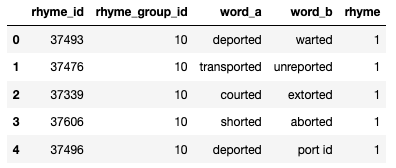
Now that we have a dataset of words that rhyme, the next step is to create some negative samples (i.e. words that don’t rhyme). Since we created a rhyme_group_id to track groups of words which rhyme, we can generate a set of non-rhyming words by simply selecting a sample of word_a from our rhyming dataset, and select a word from another rhyming group for the word_b value. Of course there is a small chance that the word from the other rhyming group may actually rhyme which the word_a value but the chances of this are very small so we are happy to use this approach.
non_rhyme_df = rhyme_df.copy()
for rhyme_group in tqdm(list(rhyme_df['rhyme_group_id'].drop_duplicates())):

    words_in_group = len(rhyme_df.loc[rhyme_df['rhyme_group_id'] == rhyme_group])

    other_rhyme_samples = list(
        non_rhyme_df.loc[non_rhyme_df['rhyme_group_id'] != rhyme_group, 'word_b'].sample(words_in_group)
    )

    non_rhyme_df.loc[non_rhyme_df['rhyme_group_id'] == rhyme_group, 'word_b'] = other_rhyme_samples

non_rhyme_df['rhyme'] = 0
non_rhyme_df = non_rhyme_df.drop_duplicates(subset=['word_a', 'word_b'], keep='first')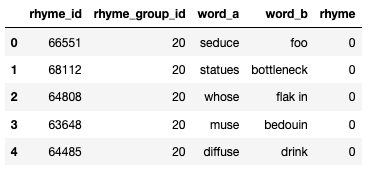
Tokenize inputs
As with any modelling task, we must convert our input to some sort of numeric representation of that input. In this case we will use the Keras Tokenizer function to create a character level encoding for each word in our dataset. If you are unfamiliar with tokenizing, this process will simply convert each word to a list of numbers, where each number can be mapped to a single character in the word. For example the phrase “Hello world” could be converted into something like [5, 17, 4, 4, 3, 9, 6, 9, 10, 4, 34] (notice that the l’s are all represented by the number 4).
To create a tokenized version of each word in our dataset we will first fit a tokenizer object on the data before using a function we define called tokenize_inputs to return a tokenized version of each row in our dataset. Note that this function also limits the max length of a phrase our model can analyze to 64 characters. Of course if you want to mess around with this, you can just change the MAX_LEN value.
def tokenize_inputs(phrase_a, phrase_b, tokenizer):

    tokenized_phrases = tokenizer.texts_to_sequences([phrase_a, phrase_b])

    # now loop through inputs and pad or reduce size if required
    tokenized_phrases_for_output = []
    for phrase in tokenized_phrases:
    if len(phrase) < MAX_LEN:
        length_to_pad = MAX_LEN - len(phrase)
        phrase_for_output = ([0] * length_to_pad) + phrase
    elif len(phrase) > MAX_LEN:
        phrase_for_output = phrase[-MAX_LEN:]
    else:
        phrase_for_output = phrase
    tokenized_phrases_for_output.append(phrase_for_output)

    return tf.constant(tokenized_phrases_for_output, dtype=tf.float64)


tokenizer = Tokenizer(char_level=True, lower=True)
tokenizer.fit_on_texts(df['word_a'] + df['word_b'])

df['word_tokens'] = df.progress_apply(
    lambda row: tokenize_inputs(row['word_a'], row['word_b'], tokenizer), axis=1
)
Train, test & valiation split
Once we have a dataset of rhyming and non-rhyming words the final step before we get stuck into the modelling side of things will be to split the data into training, testing, and validation datasets. Now deepending on the capabilities of your machine, you may only want to look at a subset of the entire 7 million row dataset. When I performed the modelling for this tutorial, I just focused on a subset of 1 million rows (with a 50:50 split of rhyme vs non-rhyme).
Once that is out of the way, we can use sklearn’s train_test_split function to split our dataset into 60% training, 30% testing, and 10% validation. It is worth noting that we use the stratify parameter to ensure that the 50:50 split between rhyming and non-rhyming words is maintained in each partition.
X_train, X_test, y_train, y_test = train_test_split(
    list(df['word_tokens']), list(df['rhyme']), stratify=df['rhyme'],
    test_size=0.4, random_state=123
)

X_test, X_val, y_test, y_val = train_test_split(
    X_test, y_test, stratify=y_test, test_size=0.25, random_state=123
)
Modelling
Model architecture
Now that the data is downloaded and tokenized, we are ready to get stuck into the modelling side of things. To model the rhyming words we will build a Siamese neural network to analyse the characters in each word before making a prediction.
At this point it is understandable to wonder what makes a neural network a Siamese one. A Siamese neural network is a neural network in which a portion of the architecture uses the same weights on different input vectors (i.e. the same exact same layer will be used multiple times in the model with different inputs). In our case the Siamese portion of our network will be a single LSTM which analyses each character in the two sets of input tokens.
From here, we will will subtract the outputs from the LSTM for each input to create a single 64-D vector (or whatever you set MAX_LEN as) before we pass this vector through 3 dense layers which use the relu activation function. Finally we make a prediction on whether or not the two phrases rhyme using a single unit dense layer with the sigmoid activation function. If model predicts a value > 0.5, we will say that the model thinks the two inputs rhyme.

Since this is a binary classification task, we will use the binary_crossentropy loss function, we will also use the Adam optimizer as is best practice.
We can create this model using the function defined below:
def create_model():

    word_a_input_tokens = Input(
      shape=(MAX_LEN, 1), name='word_a_input_tokens'
      )
    word_b_input_tokens = Input(
      shape=(MAX_LEN, 1), name='word_b_input_tokens'
      )

    common_lstm = LSTM(64, return_sequences=False, activation="relu", name="common_lstm_layer")

    word_a_lstm_output = common_lstm(word_a_input_tokens)
    word_b_lstm_output = common_lstm(word_b_input_tokens)

    #concatenate_lstm_outputs
    concat_layer = Subtract(name="concatenate_lastm_outputs")(
      [word_a_lstm_output, word_b_lstm_output]
      )

    # dense layers before final classification
    dense_layers = Dense(64, activation="relu", name="first_dense_layer")(concat_layer)
    dense_layers = Dropout(0.5)(dense_layers)

    dense_layers = Dense(32, activation="relu", name="second_dense_layer")(dense_layers)
    dense_layers = Dropout(0.5)(dense_layers)

    dense_layers = Dense(8, activation="relu", name="third_dense_layer")(dense_layers)
    dense_layers = Dropout(0.5)(dense_layers)

    classification_layer = Dense(1, activation="sigmoid", name="classification_layer")(dense_layers)

    model = Model(
      inputs=[word_a_input_tokens, word_b_input_tokens],
      outputs = classification_layer
      )

    model.compile(
      loss="binary_crossentropy",
      metrics=["accuracy"],
      optimizer="Adam"
    )

    return model
Train model
Now that we have everything ready to go, the next step is to train the model. We can do this by passing our data, and model into Keras’ fit function. Before we do this however, we will set up three callbacks that will help us when training the model:
-
ModelCheckpoint: This is will save the best version of the model by continually analysing the validation loss at each epoch and saving the model with the lowest validation loss, prevent any overfitting from taking place. -
TerminateOnNaN: This will once again monitor the validation loss but will stop the training process if the model achieves a NULL or NA loss (this can be caused by vanishing or exploding gradients). -
CSVLogger: This will log the training and validation loss at each step in case we want to go back after the model has completed training and plot the loss or debug any training issues.
Once these are defined, we can fit the model to our data using the code below:
model = create_model()

model_checkpoint = ModelCheckpoint("models/rhyme_model.hdf5",monitor="val_loss")
terminate_on_nan = TerminateOnNaN()
csv_logger = CSVLogger('training.log')

history = model.fit(
    [X_train[:, 0], X_train[:, 1]],
    y_train,
    batch_size=128,
    epochs=100,
    callbacks=[model_checkpoint, terminate_on_nan, csv_logger],
    validation_data=([X_val[:, 0], X_val[:, 1]], y_val)
)
Its worth pointing out here that if your machine struggles to train these kind of deep learning models, I would recommend you give Google Colab a try. They have a cloud version of Jupyter which you can use to train models.
Evaluate model
Once the model has completed training and we are happy with its loss on the validation set during that process we are ready to test the model on some unseen data.
To do this we can just pass our training data into the model using the predict method on the model object to get a set of predictions. From here we round the prediction values to the nearest whole number (0 or 1) before comparing them to the actual values using sklearn’s classification_report.
# load the model
model = load_model("models/rhyme_model.hdf5")

X_test = tf.convert_to_tensor(X_test)
y_test = tf.convert_to_tensor(y_test)

y_pred = model.predict([X_test[:, 0], X_test[:, 1]])
y_pred = y_pred > 0.5
Taking a look at the output from my model which was trained on only a subset of the data, we can see that we are able to achieve 95% accuracy using this type of deep learning architecture!
              precision    recall  f1-score   support

           0       0.96      0.94      0.95    150000
           1       0.94      0.96      0.95    150000

    accuracy                           0.95    300000
   macro avg       0.95      0.95      0.95    300000
weighted avg       0.95      0.95      0.95    300000
Run some sample song lyrics through the model
To perform a sanity check on the model, and to show it in action we can pass in some sample song lyrics from famous rappers to the model, and look at the results.
samples = [
   ["Cornish hens switchin' positions", "auditionin' mortitions"], # MF DOOM Rhyme
   ["Lived happily ever after", "but that's another chapter"], # Outkast rhyme
   ["I keep some E&J, sittin' bent up in the stairway", "Y'all know my steelo, with or without the airplay"],# Nas rhyme
   ["I guess every superhero need his theme music", "No one man should have all that power"], # Kanye non-rhyme
   ["In the city of L.A", "In the city of good ol' Watts"], # Tupac non-rhyme
]

sample_tokens = [tokenize_inputs(lyrics[0], lyrics[1], tokenizer) for lyrics in samples]
sample_tokens = tf.convert_to_tensor(sample_tokens)
sample_pred = model.predict([sample_tokens[:, 0], sample_tokens[:, 1]])
predictions = [round(pred[0], 4) for pred in sample_pred]
for i in range(len(samples)):
    print(f"Lyric 1: {samples[i][0]}")
    print(f"Lyric 2: {samples[i][1]}")
    print(f"{'Rhyme' if predictions[i] > 0.5 else 'Non-rhyme'}({predictions[i]})")
    print("---------------\n")
Lyric 1: Cornish hens switchin' positions
Lyric 2: auditionin' mortitions
Rhyme(0.9860000014305115)
---------------

Lyric 1: Lived happily ever after
Lyric 2: but that's another chapter
Rhyme(0.9860000014305115)
---------------

Lyric 1: I keep some E&J, sittin' bent up in the stairway
Lyric 2: Y'all know my steelo, with or without the airplay
Rhyme(0.9652000069618225)
---------------

Lyric 1: I guess every superhero need his theme music
Lyric 2: No one man should have all that power
Non-rhyme(0.0)
---------------

Lyric 1: In the city of L.A
Lyric 2: In the city of good ol' Watts
Non-rhyme(0.0)
---------------
Closing thoughts
In this blog post I showed how we can generate a dataset and build a simple rhyme detection model using a Siamese neural network implemented in Keras.
Of course there are many other directions you could go with this project, and if you are looking to expand on the work done here I would recommend two additional projects you could work on:
-
Instead of fitting your own tokenizer and LSTM, try using one of the pre-trained tokenizers and language models from the amazing Hugging Face Transformers library and see if that can improve the results.
-
Expand this model (and dataset) to not only detect whether or not words rhyme but also detect what type of rhyme they are (perfect rhyme, half rhyme, etc)
Once again, if you would like the full code used in the form of a jupyter notebook, please feel free to download it from my GitHub repository!